
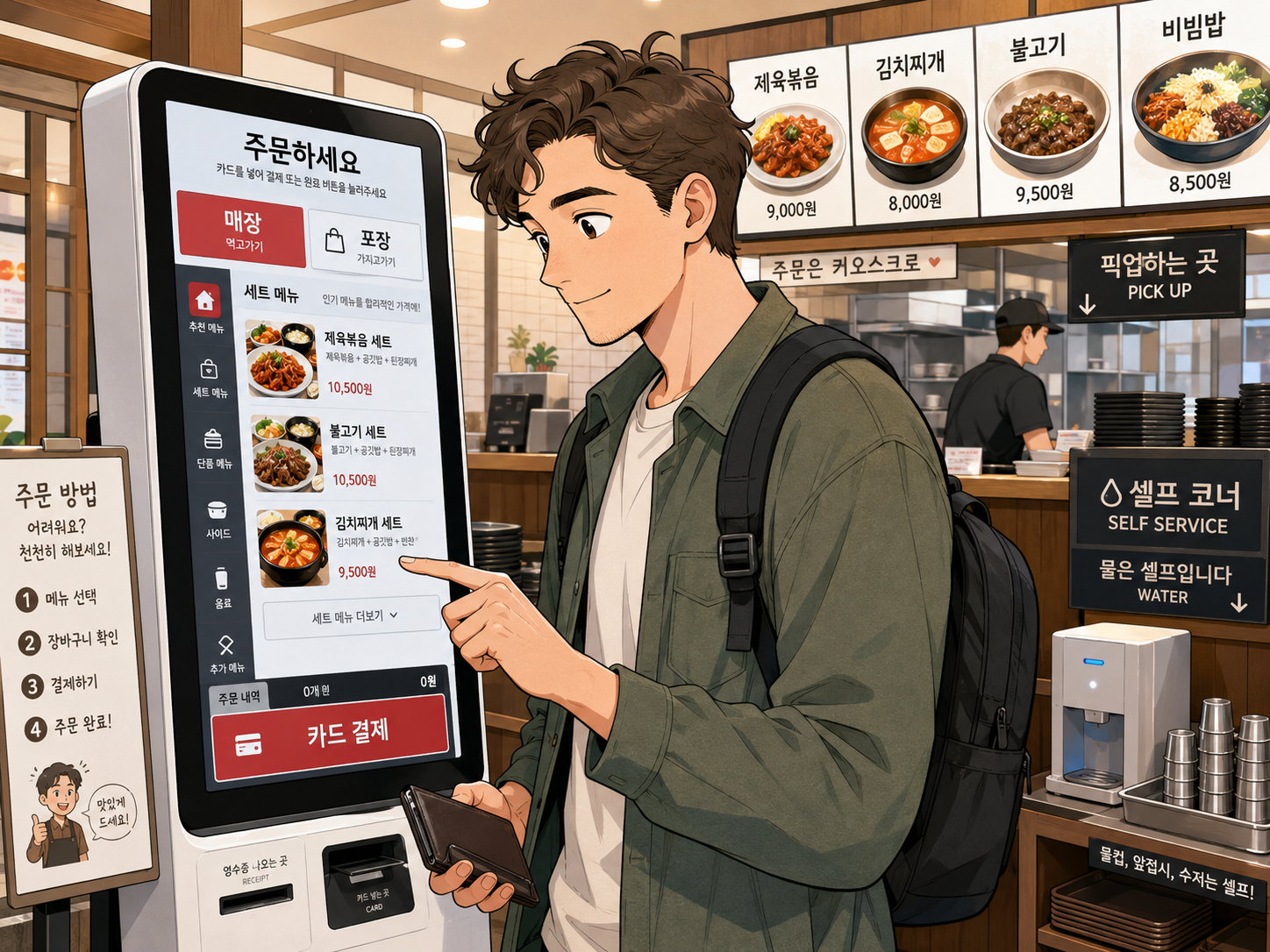
Self-service kiosks are now common in Korean restaurants, cafes, food courts, cinemas, and fast-food chains. For Korean customers, ordering from a kiosk may feel routine. For an international visitor, the machine can be confusing: the screen may be partly Korean, a foreign credit card may fail, and several unfamiliar options may appear before payment.
You may need to decide whether you are eating inside, taking the food away, choosing a set menu, adding side dishes, adjusting spice level, or skipping a phone-number prompt. The good news is that most Korean kiosks follow a similar sequence.
1. Where are kiosks commonly used?
You may encounter a kiosk at fast-food restaurants, cafes, bubble-tea shops, noodle restaurants, gimbap shops, food courts, dessert stores, cinemas, highway rest areas, university cafeterias, and small restaurants with few employees.
Some restaurants use a kiosk only for ordering. Others use it for both ordering and payment. At a few places, the kiosk prints a meal ticket that you must give to the kitchen or a staff member. Do not assume that payment automatically sends the order to the kitchen; read the final screen and check what other customers do.
2. Look for a language button first
Many kiosks in tourist areas and major franchises provide language options such as English, Japanese, Simplified Chinese, or Traditional Chinese. The language button may appear in a corner, at the bottom of the screen, on the first welcome screen, as a globe symbol, or as 언어, meaning "language."
| Korean | Meaning |
|---|---|
| 언어 | Language |
| 한국어 | Korean |
| 영어 | English |
| 일본어 | Japanese |
| 중국어 | Chinese |
| 외국어 | Foreign language |
Even after selecting English, some menu names, ingredients, or option labels may remain in Korean. Use food photographs, prices, and Korean menu names together rather than relying on one translated phrase.
3. Choose dine-in or takeaway
One of the first questions is often whether you will eat inside or take the food away. At a kiosk, 매장 usually means dine in, and 포장 usually means takeaway or takeout.
| Korean | Meaning | Use |
|---|---|---|
| 매장 | Dine in | Eat or drink inside. |
| 매장 식사 | Eat in the restaurant | Restaurant wording for dine-in. |
| 먹고 가기 | Eat here | Casual dine-in wording. |
| 포장 | Takeaway | Food packed to go. |
| 포장 주문 | Takeaway order | Takeout order screen. |
| 테이크아웃 | Takeout | Loanword used at cafes. |
Be careful with 포장. Its literal meaning is related to packaging, but on a restaurant kiosk it normally means takeaway. At some cafes, dine-in and takeaway prices or packaging may differ.
4. Browse menu categories
The menu is often divided into categories. A set menu usually combines a main item with one or more sides or drinks. An individual item is the food alone without the complete set. Do not assume that a set is always cheaper; check what it includes.
| Korean | Meaning |
|---|---|
| 추천 메뉴 | Recommended menu |
| 인기 메뉴 | Popular menu |
| 신메뉴 | New menu |
| 메인 메뉴 | Main dishes |
| 세트 메뉴 | Set meals |
| 단품 | Individual item |
| 음료 | Drinks |
| 사이드 | Side dishes |
| 디저트 | Desserts |
| 추가 메뉴 | Additional items |
5. Select the menu item and quantity
Touch the picture or name of the food you want. The next screen may show price, ingredients, serving size, spiciness, available options, allergy information, set combinations, or paid toppings. Use plus and minus buttons to change quantity, and check the count before adding the item to your cart.
| Korean | Meaning |
|---|---|
| 수량 | Quantity |
| 개 | Item or piece |
| 인분 | Serving or portion |
| 추가 | Add |
| 빼기 | Remove |
| 선택 | Select |
6. Understand required and optional choices
Some kiosks will not let you continue until you select a required option. Required choices may include drink, size, sauce, temperature, spiciness, side dish, ice level, sugar level, noodles, rice, bread, dine-in cup, or disposable cup.
| Korean | Meaning |
|---|---|
| 필수 선택 | Required selection |
| 옵션 선택 | Select an option |
| 선택 완료 | Selection complete |
| 추가 선택 | Additional selection |
| 변경 | Change |
| 기본 | Basic or standard |
| 선택 안함 | Do not select |
| 없음 | None |
7. Size, temperature, sugar, and spice options
Cafe and fast-food kiosks often ask for size and temperature. Bubble-tea stores may ask for sweetness and ice. Korean restaurants may ask for spice level. Larger sizes, toppings, or upgrades usually add a charge, so check the final total before payment.
| Korean | Meaning |
|---|---|
| 작은 사이즈 | Small size |
| 보통 | Regular |
| 큰 사이즈 | Large size |
| 따뜻한 | Warm or hot |
| 아이스 | Iced |
| 당도 | Sweetness level |
| 얼음 적게 | Less ice |
| 안 매운맛 | Not spicy |
| 순한맛 | Mild |
| 매운맛 | Spicy |
Korean "mild" may still taste spicy to someone who rarely eats chili. When unsure, choose the least spicy option.
8. Removing ingredients and handling allergies
A kiosk may provide buttons for removing visible ingredients, such as onion, cheese, sauce, or pickles. However, selecting a removal option does not guarantee that a sauce, broth, or premade mixture is free of that ingredient. For serious allergies, religious restrictions, or strict dietary needs, do not rely only on the kiosk. Ask staff directly before paying.
| Korean | Meaning |
|---|---|
| 빼 주세요 | Please leave it out |
| 제외 | Exclude |
| 양파 빼기 | No onion |
| 치즈 빼기 | No cheese |
| 소스 빼기 | No sauce |
| 알레르기가 있어요. | I have an allergy. |
9. Check the shopping cart
Before payment, review the cart carefully. Check menu item, quantity, size, hot or iced, dine-in or takeaway, added toppings, removed ingredients, and total price. To delete an item, look for 삭제, a trash-can symbol, an X symbol, 취소, or the minus button.
| Korean | Meaning |
|---|---|
| 장바구니 | Shopping cart |
| 주문 내역 | Order details |
| 주문 확인 | Review order |
| 선택 메뉴 | Selected items |
| 총 주문 금액 | Total order amount |
| 총 결제 금액 | Total payment amount |
10. Understand the payment screen
Most restaurant kiosks accept cards, and some are card-only. A cash button may not appear even when cash is accepted at a staffed counter. If your card fails, try inserting the physical card, try a second card, ask staff for help, or pay at the counter if possible.
| Korean | Meaning |
|---|---|
| 결제하기 | Pay |
| 결제 수단 | Payment method |
| 카드 결제 | Card payment |
| 신용카드 | Credit card |
| 체크카드 | Debit card |
| 현금 결제 | Cash payment |
| 간편결제 | Mobile or simplified payment |
| 쿠폰 | Coupon |
| 상품권 | Gift certificate |
11. Card reader instructions
Do not pull the card out while the payment is processing. Removing it too early may cancel the payment or make it unclear whether the charge was completed.
| Korean | Meaning |
|---|---|
| 카드를 넣어 주세요 | Please insert the card |
| 카드를 대 주세요 | Please tap the card |
| 카드를 긁어 주세요 | Please swipe the card |
| 카드를 빼 주세요 | Please remove the card |
| 결제 중입니다 | Payment is processing |
| 승인 완료 | Payment approved |
| 결제 완료 | Payment complete |
| 결제 실패 | Payment failed |
| 승인 거절 | Payment declined |
12. Cash, mobile payments, and phone-number prompts
Not every kiosk accepts cash. A cash-compatible kiosk will usually have a banknote slot, coin slot, change-return area, and 현금 결제 button. Korean mobile-payment services such as Kakao Pay, Naver Pay, Samsung Wallet, Payco, Toss Pay, or Zero Pay may require a Korean phone number, identity verification, domestic card, or Korean bank account.
Some kiosks ask for a phone number for loyalty points, digital receipts, waiting-list messages, or membership benefits. In most ordinary restaurant transactions, visitors can select 건너뛰기, 비회원, 적립 안함, or a similar skip option. Do not enter a random phone number.
13. Take the receipt and order ticket
After payment, the kiosk may print a payment receipt, order confirmation, numbered waiting ticket, meal coupon, or two separate pieces of paper. Wait a few seconds and check the printer again. Your order number may appear as 주문번호, 대기번호, 번호표, or 호출번호.
Keep the ticket until you receive your food. Korean number announcements may be hard to understand in a noisy restaurant, so watch the display and compare the number with your receipt.
14. Collect food, water, side dishes, and utensils
Restaurants use different collection systems. Your food may be ready when your number appears on a screen, a pager vibrates, staff calls your number, or the order is placed at a pickup counter. Look for 픽업, 수령, 음식 받는 곳, 배식구, or a tray symbol.
VisitKorea notes that some Korean restaurants use self-service water, side dishes, and unmanned order machines. Water, utensils, napkins, and extra side dishes may be at a self-service station rather than brought to your table. Many tables also have a shallow drawer holding spoons and chopsticks.
15. Return the tray after eating
At self-service restaurants and food courts, customers are usually expected to return trays and dishes. Look for 퇴식구, 반납, 식기 반납, 음식물 쓰레기, 일반 쓰레기, or 분리수거. Do not leave the tray on the table unless the restaurant provides table service.
16. What if the kiosk has no English?
Use menu photographs, compare prices with the wall menu, use your phone's camera translation feature, look for familiar Korean buttons, watch how another customer completes an order, or ask staff for help. Camera translation is helpful, but it can misunderstand dish names, ingredients, regional food terms, and allergy information.
17. Food allergies and dietary restrictions
A kiosk cannot always provide complete ingredient information. A dish may contain fish sauce, shrimp paste, anchovy broth, egg, milk, soy, wheat, sesame, peanuts, shellfish, or meat-based stock even when the photo looks simple. For a serious allergy, speak directly with staff before paying.
Vegetarian and vegan visitors should also be careful. A vegetable dish may still contain meat broth, fish sauce, anchovy stock, egg, seafood seasoning, or meat garnish. List the specific ingredients you cannot eat rather than relying only on the word "vegan."
18. Food courts, cafes, and fast-food kiosks
A food court may use one central kiosk for several restaurants. Select the restaurant, choose the menu, pay, receive an order number, watch the central display, collect the food from the correct counter, and return the tray to the designated area.
Cafe kiosks often include options for hot or iced drinks, cup size, type of milk, extra shots, syrup, whipped cream, ice amount, loyalty points, and disposable items. Fast-food kiosks often encourage upgrades and additions, so check whether you chose 단품 or 세트 before paying.
19. Cancelling, mistakes, and payment problems
Before payment, use 이전, 취소, 삭제, 주문 수정, or 처음으로 to change the order. After payment, changes may be difficult because the kitchen may begin preparing food immediately. Ask staff as soon as possible.
If you were charged but no ticket printed, do not pay again immediately. Check the final screen, banking notification, printer slot, and preparation screen, then ask staff to check the kiosk record. If you were charged twice, keep both receipts or notifications and ask staff to review the transaction history.
Essential Korean kiosk words
| Korean | Meaning |
|---|---|
| 주문하기 | Place an order |
| 매장 | Dine in |
| 포장 | Takeaway |
| 메뉴 | Menu |
| 세트 | Set |
| 단품 | Individual item |
| 수량 | Quantity |
| 추가 | Add |
| 제외 | Exclude |
| 장바구니 | Shopping cart |
| 주문 확인 | Review order |
| 결제하기 | Pay |
| 카드 결제 | Card payment |
| 현금 결제 | Cash payment |
| 이전 | Previous |
| 다음 | Next |
| 확인 | Confirm |
| 취소 | Cancel |
| 삭제 | Delete |
| 품절 | Sold out |
| 영수증 | Receipt |
| 주문번호 | Order number |
| 준비 중 | Preparing |
| 수령 가능 | Ready for collection |
| 픽업 | Pickup |
| 셀프 | Self-service |
| 퇴식구 | Tray return |
Useful Korean phrases
| Korean | Pronunciation | Meaning |
|---|---|---|
| 영어 메뉴 있어요? | Yeongeo menyu isseoyo? | Do you have an English menu? |
| 주문 좀 도와주세요. | Jumun jom dowajuseyo. | Please help me order. |
| 매장에서 먹을게요. | Maejangeseo meogeulgeyo. | I'll eat here. |
| 포장해 주세요. | Pojanghae juseyo. | Please make it takeaway. |
| 제일 안 매운 걸로 주세요. | Jeil an maeun geollo juseyo. | Please make it the least spicy. |
| 이거 하나 주세요. | Igeo hana juseyo. | One of this, please. |
| 외국 카드가 안 돼요. | Oeguk kadeuga an dwaeyo. | My foreign card is not working. |
| 현금으로 결제할 수 있어요? | Hyeongeumeuro gyeoljehal su isseoyo? | Can I pay in cash? |
| 주문번호가 뭐예요? | Jumunbeonhoga mwoyeyo? | What is my order number? |
| 어디서 받아요? | Eodiseo badayo? | Where do I collect it? |
| 수저 어디 있어요? | Sujeo eodi isseoyo? | Where are the utensils? |
| 주문을 잘못했어요. | Jumuneul jalmothaesseoyo. | I made a mistake with my order. |
| 영수증이 안 나왔어요. | Yeongsujeungi an nawasseoyo. | The receipt did not print. |
| 결제가 두 번 됐어요. | Gyeoljega du beon dwaesseoyo. | I was charged twice. |
Kiosk ordering checklist
- Dine-in or takeaway is correct.
- Menu item, quantity, size, temperature, and spice level are correct.
- Paid toppings or set upgrades were not added by mistake.
- The total price and payment method are correct.
- Payment was approved and you took your card back.
- You collected the receipt or order ticket.
- You know the order number and pickup counter.
- You know whether water, utensils, side dishes, and tray return are self-service.
FAQ
Do Korean kiosks have English?
Many kiosks at large franchises and tourist locations offer English, but not every machine does. Some screens may remain partly in Korean after changing the language.
Do Korean kiosks accept foreign cards?
Many do, but acceptance depends on the machine, payment processor, and card issuer. Carry a second physical card and some Korean cash.
Can I pay cash at a kiosk?
Some kiosks accept both cards and cash, while many accept cards only. Cash payment may be available at a staffed counter.
What does 포장 mean?
At a restaurant or cafe, 포장 means takeaway or takeout.
What does 매장 mean?
On a kiosk, 매장 means that you will eat or drink inside the establishment.
Do I need a Korean phone number?
Usually not for an ordinary kiosk order. When asked for a number for loyalty points or receipts, look for a skip or non-member option.
Should I return the tray?
At food courts and self-service restaurants, customers are usually expected to return trays and dishes to the designated area.
Can a kiosk handle food allergies?
It may show basic allergy or ingredient information, but it cannot guarantee that a dish is safe. Speak directly with staff about serious allergies.
Sources and further reading
Food delivery and restaurant reservation apps are different from ordinary kiosk ordering. They may require a Korean phone number, local payment method, or separate identity flow, so KoreaVibes treats those as separate guide topics.